Draw Animation: Draw Cartoons
- 3.8
- Rating
- 100.00K
- Installs
- Free
- Price
 Analysis by App-foxy
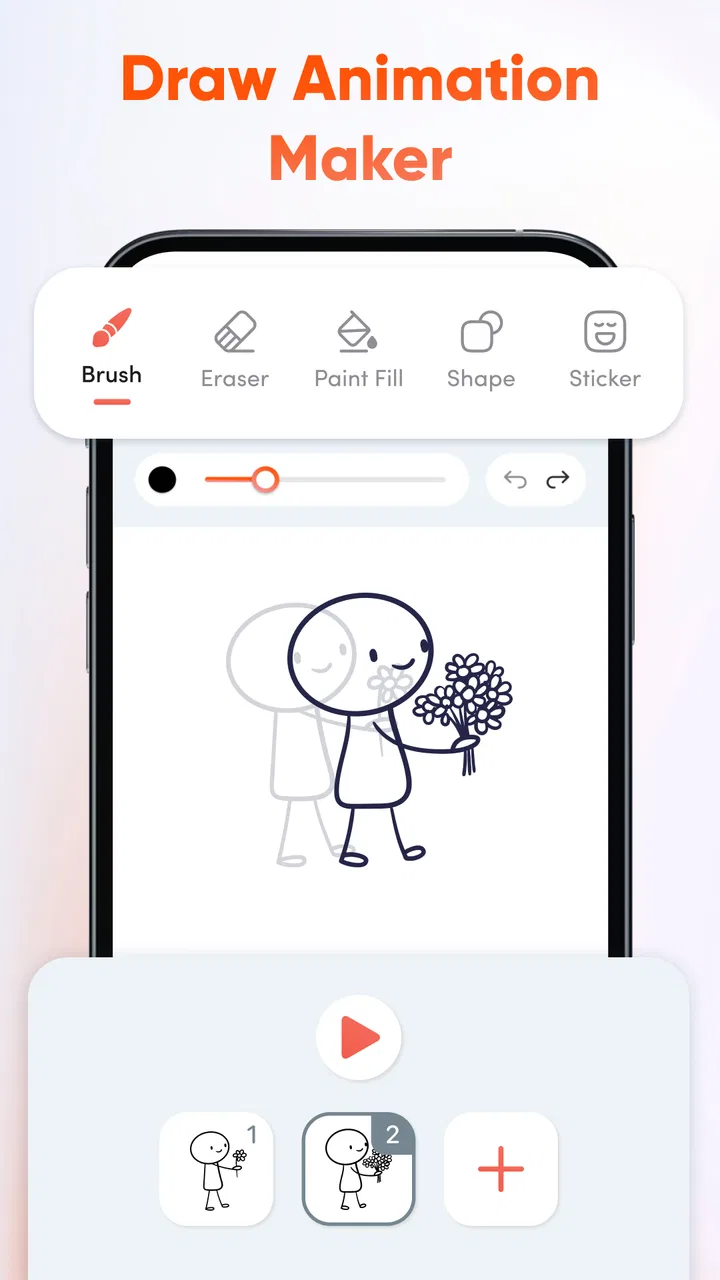
I approached Draw Animation: Draw Cartoons as a small, approachable animation studio rather than a replacement for a full professional drawing package. That distinction matters. The app is aimed at turning simple drawings into moving cartoons, and its greatest appeal is the directness of that process: you draw, adjust the next moment, and gradually build motion one frame at a time. I found that idea more useful for quick experiments and learning than for polished production.
My overall view is positive but measured. This is a free art and design app from YakinGlobal, rated for Everyone, with a current version of 1.1.2 and support for Android 7.0 or later. Its rating sits at 3.5 from over 800 ratings, while its install count has passed 100K. Those figures suggest that it has found a real audience, although they also fit my impression that the experience is accessible without being especially deep.
What the drawing-to-animation workflow feels like
The central pleasure is seeing a still sketch acquire movement. Instead of treating animation as something reserved for people who already understand timelines, keyframes, and complicated editing panels, the app presents the basic idea in a much less intimidating way. Each drawing represents a moment, and the sequence becomes the action. For a first attempt at a bouncing ball, a waving hand, or a character turning its head, that simple mental model is exactly what I would want.
You May Also Like

 Blood Strike: 2.5 Anniversary
Blood Strike’s Loadouts Turn Every Drop Into a Tactical Gamble
A close look at Blood Strike’s custom loadouts: how fast access to signature weapons reshapes its battle royale rhythm, rewards preparation, and narrows the gap between fights.

 Pandora - Music & Podcasts
Pandora’s Music Is Easy to Start, but Harder to Recover
Pandora’s strength is its low-effort path from a seed to a station. Its weak spot is how much confidence it asks you to place in connection, setup, and quiet recovery.

 8 Ball Pool
 Is Built on Rivalries, Rematches, and Routine
A close look at the rivalries, rematches, shared routines, and unanswered safety questions that turn a quick pool match into a persistent mobile community.

 Samsung Music
’s Quiet Strength Is Playing What You Already Own
Its reach comes less from spectacle than from dependable access to a personal library. That simplicity is both the app’s strongest retention engine and its ceiling.

 AccuWeather: Weather Radar
AccuWeather Review: A Quick, Clear Forecast for Everyday Decisions
For everyday plans, the best forecast is the one you can understand quickly. AccuWeather makes rain timing, radar, and local conditions easy to act on, with a few trade-offs.

 Hill Climb Racing
Why Hill Climb Racing Still Turns Crashes Into One More Run
A tiny car, a bumpy hill and one more upgrade: Hill Climb Racing keeps resurfacing because its simple chaos makes every near-miss feel personal.
More From Our News Desk



I especially like this approach for learning visual timing. A beginner can make a drawing, create a slightly changed version, and immediately understand why spacing between poses affects the feeling of speed. A large gap between positions can make an object appear to jump quickly; smaller changes can create a slower, smoother movement. The app does not need to turn that lesson into a formal animation course for the lesson to become visible through practice.
The experience also suits rough ideas. When I have a character concept in mind, I often do not want to spend an hour refining a single illustration before knowing whether the pose works in motion. A frame-based drawing tool lets me test the idea early. That makes it useful for storyboarding a short gag, planning a social post, or showing someone how a simple visual action should happen.
The strongest reason to try it is the low barrier between a sketch and a moving result. Many creative apps make the first screen look impressive but leave new users wondering what to do next. Here, the purpose is easier to understand: draw a sequence and watch it become an animation. That clarity is more valuable than a long feature list for someone opening an animation app for the first time.
Why frame-by-frame drawing works well for beginners
Frame-by-frame work can sound laborious, but it teaches an important habit: motion is built from visible changes. Beginners sometimes expect an app to automatically make a character move after one drawing. Automatic tools can be convenient, but they can also hide the decisions that make animation convincing. Drawing successive poses encourages the user to think about anticipation, movement, and the final position.
I would use the app to make very short studies rather than immediately attempting a complete cartoon. A ball moving across the screen is a better first exercise than a dialogue scene with several characters. Once the hand becomes familiar with creating small changes between drawings, more expressive actions become less frustrating. This gradual approach is one of the app’s practical strengths, even though it also exposes its limits when a project becomes ambitious.
A useful technique is to change only one important thing in each new drawing. If the character is walking, keep the body size and general position consistent while changing the leg placement. If everything shifts at once, it becomes difficult to tell whether the motion is intentional or simply inconsistent drawing. This kind of control is particularly important in a lightweight animation app, where the user may need to supply more of the visual discipline.
I also recommend beginning with bold, uncomplicated shapes. A thick outline and clear silhouette make movement easier to judge than a detailed illustration full of tiny marks. Once the action works, the drawing can become more elaborate. That workflow saves time and prevents a common beginner mistake: polishing frames that do not yet communicate the intended motion.
A practical everyday scenario
Imagine a student preparing a short visual explanation for a class project. They need to show how a seed grows into a plant, but a static drawing feels too limited. With this app, they could create a small sequence: the seed in the soil, the first sprout, the stem rising, and the leaves opening. The result would not need cinematic production values. It would simply make the process easier to understand and give the presentation a personal touch.
Another realistic use is a quick birthday greeting. Someone could draw a character holding a sign, add a few frames of the arms lifting, and finish with a simple message. The value is not in producing a studio-quality short film; it is in making a small, handmade animation without having to learn a complex desktop program first.
I can also see it helping parents and children work together. The Everyone age rating makes the concept suitable for a broad audience, and the activity naturally encourages drawing rather than passive viewing. An adult can help with the first sequence while the child experiments with facial expressions or movement. The best results will come from keeping expectations modest and treating the process as a creative exercise.
Where the app is convincing, and where it becomes frustrating
The app’s strongest quality is focus. It is not trying to be a general illustration suite, a video editor, and a social network at the same time. The idea of drawing cartoons through animation is clear, and that makes it easier to start experimenting. For users who have been curious about animation but have avoided professional tools, this simplicity can be the difference between creating something and abandoning the project at the setup stage.
It is also a good match for rough animation because imperfections are less damaging in an early sketch. A slightly uneven line can still communicate a bouncing object or a character waving. In fact, the handmade look may be part of the appeal for casual projects. I would not judge every frame by illustration standards when the real question is whether the action reads clearly.
There is a useful trade-off here. A simpler workflow often means fewer places to get lost, but it also gives the user less assistance when a drawing needs to stay consistent. Anyone moving from a basic animation app to a more advanced editor may miss tools associated with professional work, such as sophisticated layer management, detailed timing controls, or precision-oriented editing. I cannot recommend this as the main workspace for a long, complex production.
The frame-by-frame method itself can become repetitive. If you are creating a sequence with many movements, the amount of manual drawing grows quickly. This is not a flaw unique to this app, but it matters when choosing it over alternatives. A tool built around automated transitions or rigged characters may be more efficient for repeated motion, while this app is better when you want to draw each change yourself.
That limitation affects the type of patience required. The first few frames can feel rewarding because every change is obvious. Later, small corrections may take longer to notice, especially when an action requires many nearly identical drawings. I would save versions of important stages and keep early experiments short. A five-second idea that communicates well is a better test of the app than an overambitious project that becomes difficult to manage.
How it compares with familiar alternatives
Compared with a conventional drawing app, this one has a more immediate reason to create multiple images: each drawing contributes to motion. A normal sketching app may offer more freedom for a finished illustration, but it does not automatically encourage the user to think in sequences. If your goal is a poster, detailed portrait, or polished digital painting, I would choose a dedicated drawing tool instead.
Compared with a full video editor, the app is more suitable for hand-drawn cartoon movement than for assembling clips, music, transitions, and recorded footage. A video editor is usually the better choice when the project begins with camera footage or needs complex audio timing. This app makes more sense when the visual itself is drawn and the animation is the main point.
Compared with advanced animation software, its advantage is approachability rather than control. Professional tools can provide a more precise production environment, but they also demand more time and knowledge. I would recommend moving to one of those options when you need a long sequence, detailed character consistency, complex compositing, or a workflow shared with other creators. Starting here first can still be sensible because it teaches the basic relationship between drawings and movement.
The important comparison is not simply “simple versus powerful.” It is “which kind of decision do I want to make?” In this app, I spend more attention on the drawing in each moment. In a more advanced tool, I might spend more attention on layers, timing curves, reusable assets, and technical organization. Neither approach is automatically better. The right choice depends on whether the project is an experiment or a production.
Small workflow choices that improve the results
One of my most useful recommendations is to plan the action with three key poses before filling in extra movement. For a jump, that could be standing, highest point, and landing. These poses give the sequence a readable structure. Afterward, intermediate drawings can make the movement feel less abrupt. This prevents the common problem of producing many frames without a clear beginning, middle, or end.
Another practical tip is to check the animation repeatedly while the action is still rough. Do not wait until every drawing looks finished. A sequence can appear fine as individual images but fail when played in order because the subject drifts, changes size, or moves without a clear reason. Early playback reveals those problems while they are still easy to correct.
I also suggest designing around a strong silhouette. If a character’s arms blend into the body or an object has a complicated outline, the motion becomes harder to read. A clear profile, exaggerated pose, or contrasting shape often communicates better than extra detail. This is especially helpful for users drawing on a smaller phone screen, where fine marks can be tiring and difficult to judge.
For a longer idea, divide the work into tiny scenes rather than treating it as one continuous animation. A character entering, reacting, and leaving can be planned as separate moments. This keeps the creative goal manageable and makes it easier to identify which part needs improvement. It also helps users decide whether the app is still comfortable for their project before investing too much time.
Who should use it and who should look elsewhere
I would recommend it to beginners who want to understand hand-drawn animation without confronting a professional interface immediately. It is also a sensible choice for casual artists, students, families, and anyone who wants to make a small cartoon from personal drawings. Because the app is free, it is easy to test without turning the decision into a financial commitment.
It may also suit experienced illustrators who want a quick place to rough out movement. A professional artist might not use it for the final stage, but a lightweight sketching environment can still be useful for blocking an idea before rebuilding it elsewhere. The benefit is speed of experimentation, not advanced production control.
I would skip it if your main goal is detailed digital painting, sophisticated video editing, or highly organized animation production. It is also not my first recommendation for someone who dislikes drawing the same character repeatedly. Automated animation, reusable character systems, or motion-focused editors may reduce that workload more effectively.
Before installing, I would ask myself one simple question: do I want to draw movement manually, or do I mainly want a finished animated result with as little drawing as possible? If the answer is the first, this app is worth trying. If the answer is the second, its central workflow may feel like extra work rather than creative freedom.
My verdict after using it
Draw Animation: Draw Cartoons succeeds because it makes the basic idea of animation feel reachable. It gives beginners a clear creative task, encourages short experiments, and turns ordinary sketches into a reason to think about timing and movement. I appreciate that focus, and I think it is more valuable than a crowded interface for someone taking their first steps.
At the same time, I would not confuse accessibility with unlimited capability. Manual frame-by-frame drawing demands patience, and projects grow laborious as the number of poses increases. Users who need advanced control, detailed artwork, or a polished production pipeline will eventually want a more specialized alternative. That is a meaningful limitation, not a reason to dismiss the app.
My recommendation is to begin with a tiny project: a bouncing object, a blinking face, or a character performing one clear gesture. If that process feels enjoyable, the app has probably found its audience in you. If you are already looking for complex timelines, automated motion, or professional asset management, you will likely outgrow it quickly.
For a free Android art tool from YakinGlobal, it offers a friendly entry point into cartoon animation and a practical way to test ideas. I would install it for learning, playful projects, and quick visual messages, while keeping a more advanced application in mind for anything that needs extensive editing or production precision.
FAQs for Draw Animation: Draw Cartoons
01What is Draw Animation: Draw Cartoons used for?
Draw Animation: Draw Cartoons is an app designed for users who want to create animated cartoons from scratch. It provides a user-friendly interface with tools that allow you to sketch, animate, and edit your own cartoon characters and scenes. Ideal for both beginners and experienced animators, it offers a creative platform to express your artistic ideas.
02Is Draw Animation: Draw Cartoons suitable for beginners?
Yes, Draw Animation: Draw Cartoons is well-suited for beginners. The app includes a variety of tutorials and easy-to-use tools that guide users through the animation process. Its intuitive interface makes it accessible to those new to animation, while also offering advanced features for more experienced users. This ensures a smooth learning curve for anyone interested in animation.
03What features does Draw Animation: Draw Cartoons offer?
The app offers a wide range of features including a drawing toolset, frame-by-frame animation, and a library of pre-made characters and props. Users can also add sound effects and voiceovers to their animations. Additionally, the app supports exporting animations in various formats, allowing easy sharing on social media or other platforms.
04Are there any in-app purchases in Draw Animation: Draw Cartoons?
Yes, Draw Animation: Draw Cartoons includes in-app purchases. While the basic version of the app is free, certain advanced features, additional character packs, and tools may require a purchase. This allows users to expand their creative toolkit as they become more skilled or wish to explore new animation possibilities.
05Can I share my animations created in Draw Animation: Draw Cartoons?
Absolutely! The app allows you to export your animations in multiple formats, making it easy to share your creations on social media platforms like Instagram, Facebook, or YouTube. This feature is great for users looking to showcase their work to a wider audience or collaborate with others in the animation community.
Pros
- User-friendly interface for beginners.
- Wide range of drawing tools available.
- Supports exporting in multiple formats.
- Layering feature enhances creativity.
- Regular updates with new features.
Cons
- Limited sound effects library.
- Occasional lag with complex animations.
- Requires in-app purchases for some features.
- No offline mode for cloud saving.
- Ads can be intrusive during use.

Draw Animation: Draw Cartoons
Gallery